DCatalog provides secure document sharing for organizations that need to control access to digital publications, online collateral, and other private business content. Protect your documents with password access, existing authentication systems, secure login pages, and configurable cloud deployment options.
Choose the level of protection that fits your secure document sharing requirements:

Set a shared password that clients or other approved users can enter to access your secure documents.

Connect DCatalog to your existing authentication system so approved users can access content with their existing ID and password.
Embed protected content behind your organization’s existing HTTPS login page.
Use DCatalog’s secure document portal to validate users and connect with systems your organization already uses, including Single Sign-On (SSO), Enterprise Resource Planning systems, and document management solutions.



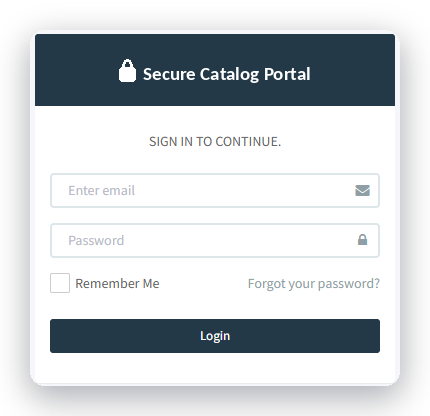
DCatalog can provide a branded login screen where authorized users enter their credentials and reset their passwords when needed.
Create users, authorize access, and restrict private content through one integrated system that stays connected to your online publications.
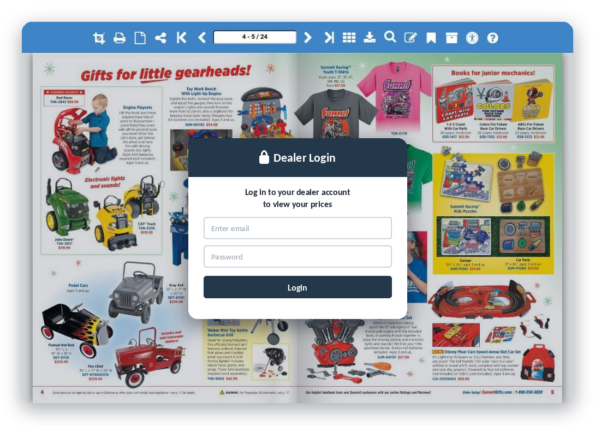

Send a custom email when a user is added, allowing them to create a unique password and access the online content assigned to them.
DCatalog helps enterprise organizations create a secure, user-friendly way to publish and share private content. Configure the solution around your publishing requirements and deploy it on DCatalog’s private dedicated servers or within your organization’s existing hosting environment.
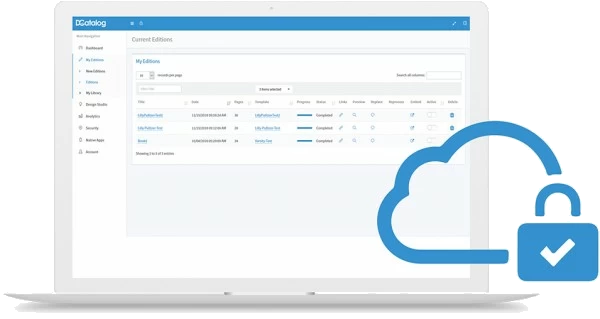
Configure your cloud environment around your digital publishing requirements to create a branded, user-friendly experience. Maintain control over how private publications are managed, delivered, and accessed by your approved audiences.
 Private Cloud Document Storage and Publishing
Deploy a private cloud publishing environment designed around your organization’s content management requirements. Manage and deliver private digital content within your own environment and on your organization’s schedule.

Use DCatalog’s cloud environment to store, maintain, and publish multiple secure editions across different branches, departments, or business units.

Upload large document libraries efficiently with batch processing, helping your team reduce manual work and meet publishing deadlines.
Use DCatalog’s multitenant SaaS platform to let authorized users manage and monitor content through a custom administrator portal from any location.

Apply your organization’s branding to secure documents, including the viewer design and URL, for a consistent experience across your private content.

DCatalog develops its platform in-house and can discuss custom features or development requirements for your secure publishing environment.

Secure document sharing gives organizations a controlled way to distribute private digital publications, online collateral, and business documents without making the content publicly available. With DCatalog, companies can place private content in a secure online environment and determine how approved users access it.
Documents can be protected with a shared password, connected to an existing authentication system, or embedded behind an organization’s HTTPS login page. This creates a more controlled experience for sharing content with employees, subscribers, vendors, partners, or clients while keeping access limited to the intended audience.
DCatalog supports multiple access options so organizations can choose how users authenticate before viewing private digital content.
Set a shared password that clients or other approved users must enter before accessing secure documents. This provides a straightforward way to protect private publications without making them publicly available.
Connect DCatalog to your organization’s existing authentication system so users can access content with their current ID and password. DCatalog can also integrate with systems already used by the organization, including Single Sign-On, Enterprise Resource Planning systems, and document management solutions.
DCatalog supports SAML SSO and holds a SOC 2 Type 2 report. See DCatalog security →
Embed secure content behind your existing HTTPS login page or use a branded login screen provided by DCatalog. The user management system can validate users, create and restrict access, support password resets, and send a custom email when a new user is added.
A secure document portal helps organizations provide controlled access to private digital content for specific audiences. DCatalog can support different access requirements for vendors, subscribers, internal teams, and other approved users.
Provide vendors, partners, or clients with controlled access to private publications, product information, and other business content. Password protection, authentication connections, and user validation help keep access limited to approved external users.
Create a private experience for subscribers who need to log in before viewing digital publications. A branded login screen and password reset option make it easier for authorized subscribers to access the content assigned to them.
Place internal publications and private business documents behind an existing employee login or connected authentication system. Organizations can create users, authorize access, and restrict content through one integrated secure publishing environment.